Digital signatures for PDF documents
Send contracts and agreements for signature, track who has signed, and download the completed PDF with every signature embedded.
The hosted service is currently free.
- Anna MartinSigned
- Daniel ReedAwaiting signature
From draft to signed PDF
Upload a PDF and add signers
Enter the signers’ email addresses in the order they should sign. When you save the draft, GoSign invites anyone who needs an account.
Send the document for signature
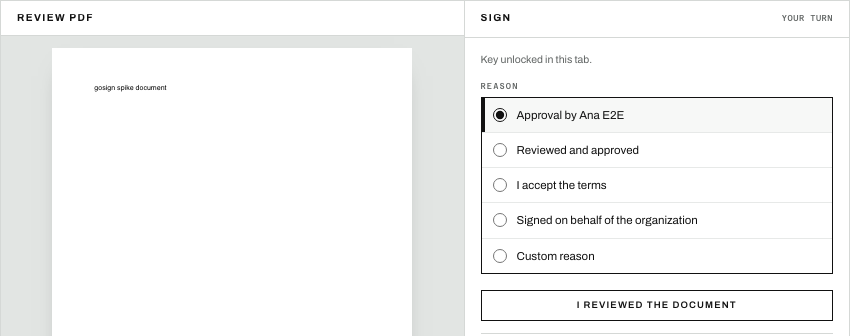
Publish the document once everyone is ready. GoSign notifies each person when it’s their turn to sign in the browser.
Download the signed PDF
Once everyone has signed, download and share the PDF with all signatures embedded.
Verify signatures without uploading the PDF
Select a PDF signed with GoSign. Your browser checks the document’s integrity, signatures, and certificates. Anyone with a copy can verify it without an account.
Open the verifier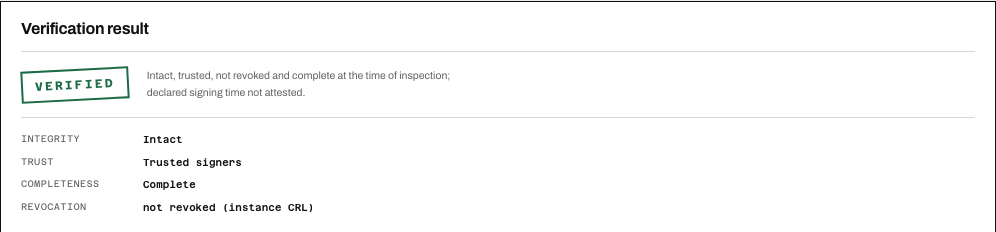
Frequently asked questions
Where is my signing key stored?
Your browser generates and stores your private signing key. The GoSign server never receives it. Keep an encrypted backup so you can restore it on another device.
What does GoSign verify?
It checks for changes to the document, confirms that all required signatures are present, and validates signer certificates against the instance’s trust root.
Can I host GoSign on my own server?
Yes. The source code and deployment instructions are available in the GoSign repository.
Send a document for signature
Try the hosted service or run GoSign on your own server.